
A TV sleep timer on your phone
Many TVs have a sleep timer buried in a menu, or none at all. Zorvo puts one on your phone: pick a time, let the volume fade, and the TV turns off by itself.
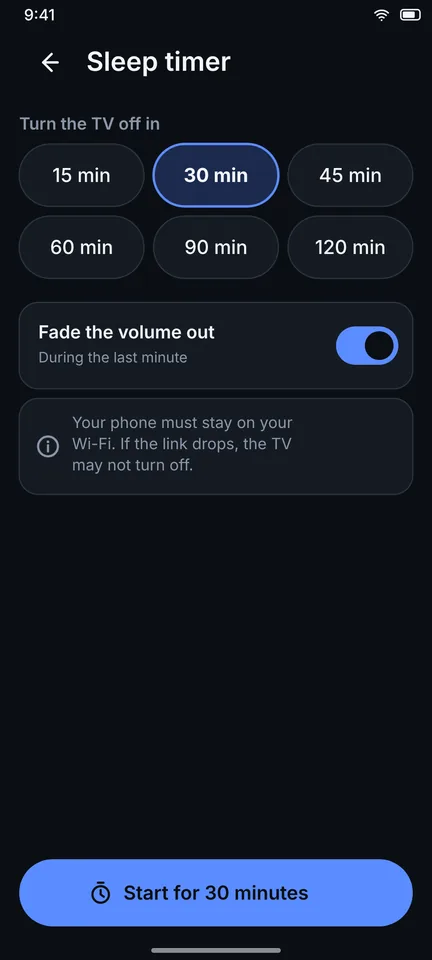
How it works
- Open Sleep timer in Zorvo and pick 15, 30, 45, 60, 90 or 120 minutes.
- Choose Fade the volume out so the sound drops gently during the last minute.
- Choose Turn the TV off at the end, or leave it off if you only want the sound to go quiet.
- Tap Start. A notification shows the time left, with +15 minutes and Cancel.
What to keep in mind
- Your phone must stay on the same Wi-Fi as the TV. If the link drops, the TV may not turn off.
- Turning the TV off at the end works on TVs Zorvo can control, and it may happen a little late. The compatibility check shows what yours supports.
Frequently asked questions
Can I add more time without opening the app?
Yes. The notification has a +15 minutes button.
What if the TV already has its own sleep timer?
Use whichever you prefer. Zorvo's timer adds the gentle volume fade and the extra 15 minutes with one tap.
Related guides
- A TV remote for grandma: big buttons, nothing else
- TV not found on the network: nine checks in order
- Zorvo FAQ: Free, Ads, Account, Privacy
Last reviewed: 2026-11-14
Zorvo is an independent app. It is not affiliated with, endorsed by or sponsored by Samsung, LG, Roku, Sony, Google, Amazon, Philips, TCL, Hisense, Xiaomi, Vizio, Panasonic or any other TV maker. All product names, logos and trademarks belong to their owners and are used only to describe compatibility. Compatibility depends on the TV model, its software version and your network. Run the in-app compatibility check to see what your TV supports.